/sends-back
/sends-back goes back to a sent user message, refills it into the input box, and truncates the conversation after that message. In the default configuration, this menu item doesn't appear in the slash menu. You can double-click ESC on the main conversation interface (when there's no streaming output) to open it.
If you've used Codex CLI, this interface will feel familiar. Compared to Codex CLI, Hunea adjusts this detail: in this interface, pressing ESC only closes the current overlay and doesn't continue bubbling to backtrack further. I've been bitten by that Codex CLI design before, so I made this distinction explicit in implementation.
This feature is useful when you want to modify a question and resend it, or continue writing from an old user input, without needing to precisely select a node and branch on the session tree like /tree. It focuses more on "modify/resend by user message" and continues from that user input.
This feature focuses on rewriting/resending, so it doesn't preserve existing conversation content. If you want to preserve content and go back to a previous message to get more answers from the model, you should use /tree instead of this feature.
It and
/treedon't both appear in the slash menu at the same time./sends-backonly appears in the menu when you setesc_rewind_mode = "entry"; with the defaultcoarsesetting, the menu shows/tree. The mutual exclusion is also mentioned in the slash menu overview.
It roughly looks like this:
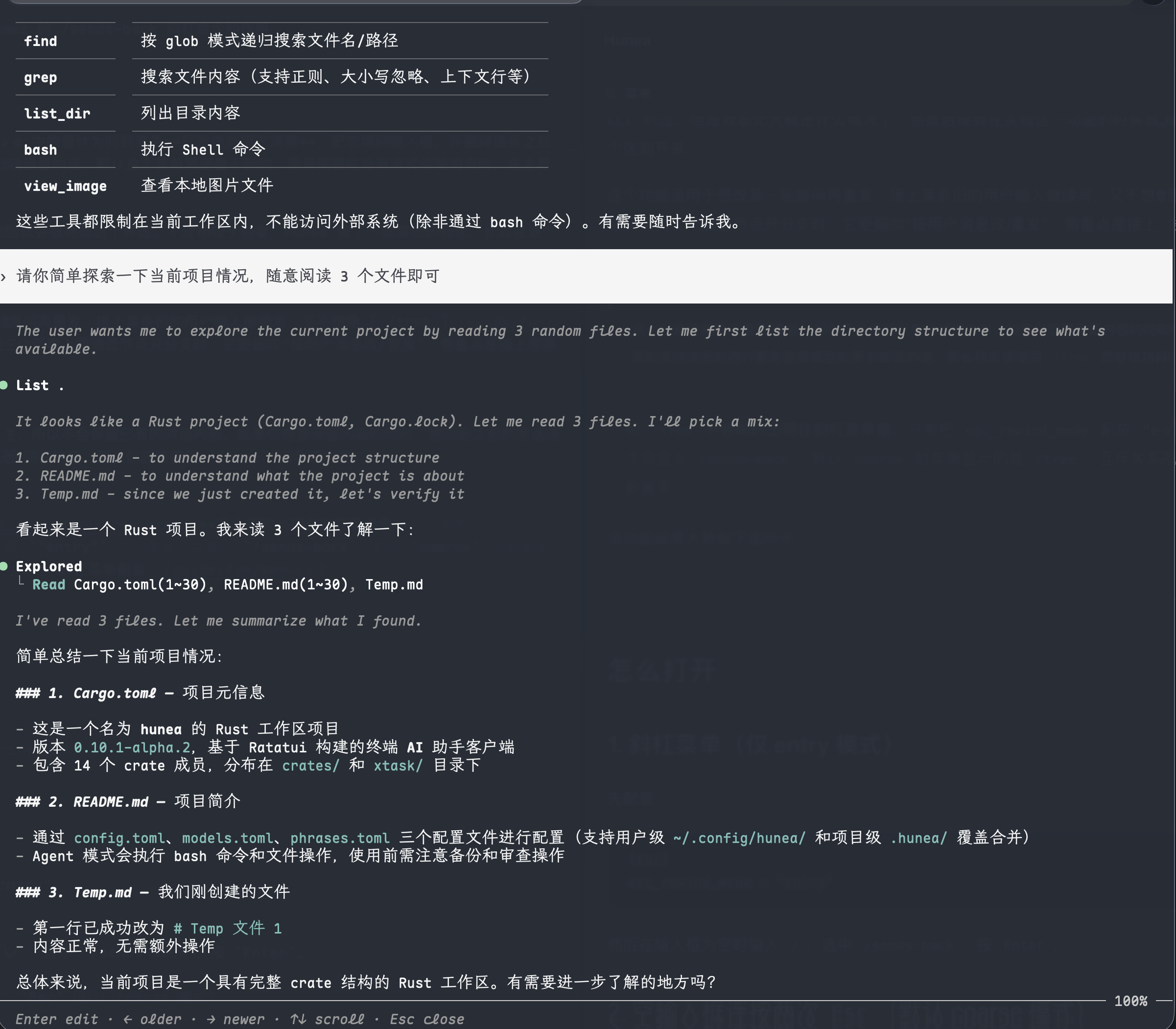
The selected previously sent message is highlighted.
How to open
1. Slash menu (entry mode only)
First configure:
Then type / when the input box is empty, select /sends-back, and press Enter.
2. Double-press Esc in empty input (default coarse mode)
With the default esc_rewind_mode = "coarse", there's no /sends-back item in the menu, but double-pressing Esc in an empty input box enters the same "backtrack by user message" interaction:
- First
Esc: status bar showsPress Esc again to edit previous message - Second
Esc: opens a full-screen conversation overlay, with the latest user message highlighted
If the prompt times out, you do something else in between, or the input box already has a draft / there's still streaming output, this backtrack usually won't proceed.
When configured to
"entry": the menu shows/sends-back; double-pressingEscin empty input opens/treeinstead. That means the menu item and double-Esccorrespond to the two backtracking modes separately, not two entries to the same thing.
Interface overview
When opened, it's a full-screen conversation overlay (reuses the transcript overlay), not a separate session tree list like /tree.
You'll generally see:
- The full visible conversation content of the current session
- The currently selected user message is highlighted
- The bottom shows a hint like:
Enter edit · ← older · → newer · ↑↓ scroll · Esc close
By default, it tries to land on the latest user message. If the current session has no user messages yet, opening via the menu may show No previous user message and won't enter the panel.
How to operate
Common operations:
←: select an older user message→: select a newer user message↑/↓, andPgUp/PgDn,Home/End: scroll the conversation (doesn't change the selected user message)Enter: confirm selecting this user message, enter the "modify/resend" flowEsc: close the overlay without changes
You can also use Ctrl + T or Ctrl + C to close the overlay (same as full-screen transcript viewing).
Note:
- Here we only iterate over user messages, it doesn't switch step-by-step between assistant replies / tool results / reasoning lines
- Left/right change the user message; up/down are mainly for scrolling the window
What happens after confirmation
After selecting a user message in the overlay and pressing Enter, Hunea roughly does:
- Closes the overlay
- Deletes this user message and everything after it from the visible conversation
- Refills the full content of this user message into the input box (tries to preserve attachment information when present)
- Synchronously truncates the session history sent to providers, so subsequent requests align with the context before this user message
- Doesn't auto-send; you can edit and send it yourself
So it's more like:
"Go back to a question, discard what comes after, edit, then send again"
Rather than:
"Open a new branch on the session tree, keep all the old content"
Note:
- If there's still an ongoing request, the runtime may refuse truncation and show an error
- The content refilled into the input box won't go into the input box's Ctrl+Z undo history; this is intentional to avoid "half-drafts getting messed up by undo"
- This differs from
/resend:/resendonly refills from global user history and doesn't change the current session tree;/sends-backchanges the current session's visible content and the context for subsequent requests
How it differs from related commands
In short:
- You want to modify "the last question" and resend →
/sends-back/ doubleEsc - You want to precisely go back to an assistant / tool node and open a branch →
/tree - You just want to reuse an old prompt, don't touch the session →
/resend
Related configuration
Usage tips
- You just want to modify the latest question: after opening, it's already on the latest user message by default — just press
Enter. - You want to go back to an older question: use
←to go to older messages; scroll with↑/↓if the content isn't fully visible. - If you still need to keep branched content later, prefer
/tree— it doesn't directly truncate existing content. - If you just want to copy or reuse an old prompt and don't want to modify the current session: use
/copyor/resend.