Per-tool enable / disable
- Date: 2026-07-16
- Commit:
feat(prompt): support per-tool enable/disable - Version cue:
0.11.1-alpha.3
Previously the Tools tab in /prompt only controlled whether a tool's usage guidelines were injected into the prompt; it couldn't actually turn a tool off. This change lets you decide, per tool, whether it's exposed to the model at all.
What changed
-
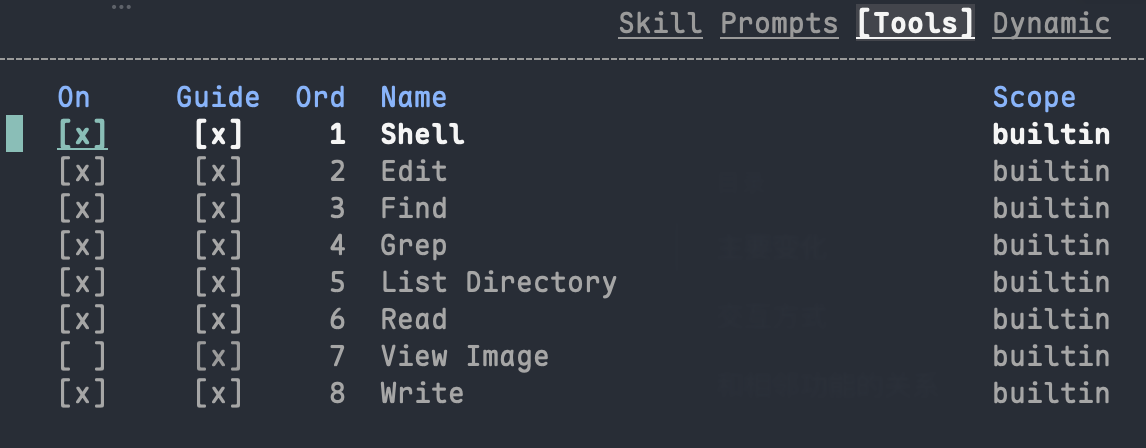
Tools tab is now an On/Guide dual-column toggle
Each tool row now has two checkbox columns:On: whether the tool itself is enabled. When off, the tool won't appear in the tool list sent to the model, so the model can't call it.Guide: whether the tool's usage guidelines are injected into the system prompt, same as the old behavior.
The On/Guide dual-column switches look like this:
-
Disabled tools are filtered in two places
TurningOnoff filters the tool out of both the provider request tool definitions and the session tool registry. Disabling isn't just "don't mention it to the model"; the tool truly isn't offered at runtime anymore. -
State is persisted
Tool enablement (tool_enablement) is written to the session store (SQLite) and project-level TOML. On an empty session the change takes effect immediately; sessions that have already started still target the "next new session", consistent with other/promptedits.
How to use it
In the /prompt panel, switch the right column to the Tools tab:
A couple of interactions to note:
- When a tool's
Onis off, itsGuidecolumn becomes non-operable (dimmed), andxis a no-op there. With the tool itself disabled, injecting only its guidelines makes no sense. - Tools that have no guidelines to begin with also have a no-op
Guidecolumn.
Related features
- For the built-in tool list, approval policy, and path boundaries, see Tools & approvals.
- Preview the final assembled prompt after toggling with
pin/prompt; see tool-definition context usage in/context. - Most edits target the "next new session". To verify immediately in a clean context, close
/promptand start a new session with/clear(alias/new).