Configurable command menu trigger
- Date: 2026-07-20
- Commit:
feat(tui): make the command menu trigger configurable - Version cue:
0.12.1-alpha.2
Previously the slash command menu could only be triggered by typing / in an empty composer. This change adds a floating command menu and makes the trigger configurable: you can keep inline /, switch to Ctrl+O floating, or enable both.
What changed
-
New
command_menu_modeconfig
Controls how the command menu is triggered, with three options:"slash"(default): only triggers the inline slash command menu when the composer starts with/, same as before."floating":/no longer triggers the menu (it's treated as plain text); open the floating command menu withCtrl+Oinstead."both": both work at once; the inline/menu and theCtrl+Ofloating menu don't interfere with each other.
-
New
Ctrl+Ofloating command menu
The floating menu scrolls up and down, and shows a scrollbar on the right when there are more commands than fit; beyond the keyboard, it also supports mouse click to select and wheel scrolling. Handy if you want to type/as a literal character, or prefer invoking commands with a fixed shortcut. It looks like this: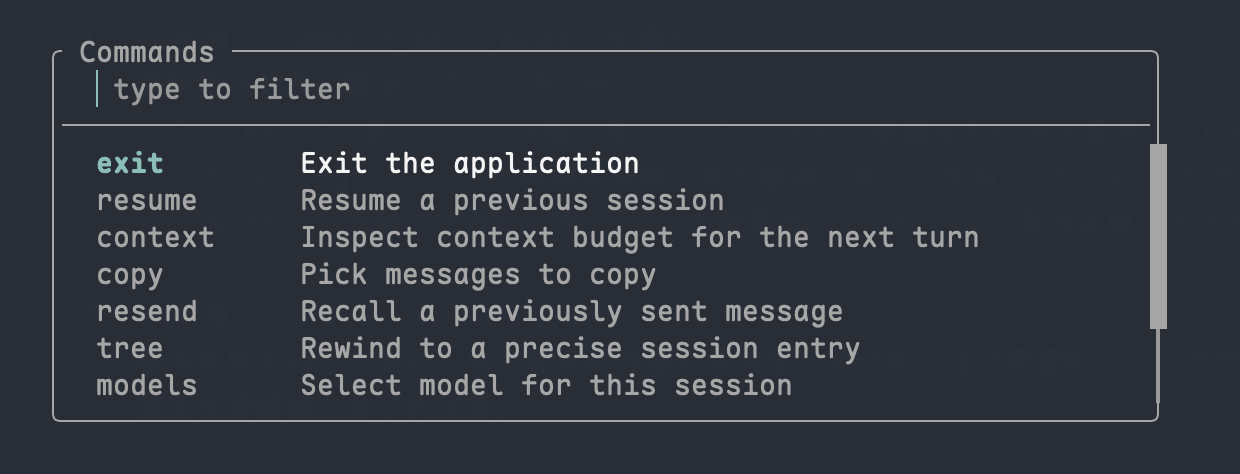
-
New
command_menu_rowsconfig
Controls how many command rows theCtrl+Ofloating menu shows at once; the rest scroll. Range7..21, default7.
Config
Under [tui] in config.toml:
For more key bindings see Keyboard Shortcuts, and for the command list see Slash menu overview.