Keep viewport + attention pill
- Date: 2026-07-17
- Commit:
feat(tui): keep viewport when unpinned and add left attention pill - Version cue:
0.11.1-alpha.5
This is a really practical quality-of-life improvement for reading conversation history: when you scroll up to read earlier messages, new content shouldn't just yank you back to the bottom.
Bottom-following behavior
- We now have a single consistent “pinned to bottom” check across the whole app.
- Streaming output and runtime refreshes only auto-scroll to the bottom when you are actually already there.
- Once you manually scroll away from the bottom, your viewport stays put — so you can keep reading in peace.
Left attention pill
When you're not at the bottom, a persistent attention pill appears on the left to let you know “there's something new below”:
The new-message pill looks like this:
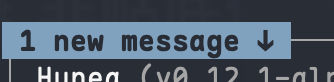
The pending-approval pill looks like this:

Both pills are clickable with the left mouse button to jump straight back to the bottom:
- Clicking first closes any non-approval fullscreen layer that's in the way, then scrolls the viewport back to the bottom (restoring bottom-following) and clears that pill.
- Clicking the approval pending pill also brings the inline approval panel back into view and gives it input focus once you're at the bottom, so you can act on it right away.
When you scroll back to the bottom, the new-message count clears. The approval pill clears when you handle or cancel the approval, or when the panel becomes visible again.
Approval panel behavior updates
- Background opening doesn't steal the fullscreen layer
Approvals can open in the background without forcibly covering whatever fullscreen view you're already looking at. - Opening/closing approval while unpinned doesn't force-scroll to bottom
You won't get interrupted while reading history by an approval yanking your viewport away. - Off-screen approval ignores action keys
When the panel isn't visible, approval hotkeys don't do anything — lowers the risk of accidentally approving something you couldn't even see.
In short: scroll up and read comfortably. The pill lets you know about new messages or approvals waiting instead of just hijacking your viewport.