Inline diff highlighting for edits
- Date: 2026-07-30
- Commit:
feat(tui): inline highlight for edit diffs and migrate diffy to similar - Version cue:
0.12.1-alpha.2
Previously, when a tool edited a file, the diff only distinguished insertions/deletions/context at the whole-line level, so you couldn't tell "which words actually changed on this line." This change introduces inline highlighting to diffs: the changed fragments within a modified (Replace) line are now marked with a more prominent emphasis style. At the same time, the diff library is migrated from diffy to similar, giving the inline diff detection better Unicode awareness.
What changed
-
Inline highlighting of changed fragments in Replace lines
When a line contains both deleted and added content, the changed fragments are rendered with "segment-level emphasis" — a more saturated background and bold on top of the whole-line tint — so you can see at a glance exactly what changed on that line. Pure context lines and entire insert/delete blocks (Insert/Delete) get no inline emphasis and keep their original whole-line styling. -
Diff library migrated to
similar(inline + unicode)
The text diff algorithm moves fromdiffytosimilar, with theinlineandunicodefeatures enabled. Inline changed fragments are split by Unicode characters, so changes to multi-byte text such as Chinese are detected more accurately. -
Diff colors consolidated into the theme palette
The inline emphasis color and the whole-line tint are now managed together intheme/palette, adapting to dark/light backgrounds. When the terminal uses its default colors (no explicit background set), they degrade automatically: the whole-line tint falls back to no background, and the emphasized fragments fall back toREVERSEDso they stay distinguishable.
Notes
- Inline refinement and line-level diff share the same 200ms cooperative computation budget; oversized blocks or very long lines that exceed the budget fall back to whole-line styling, so rendering overhead stays bounded.
- Each diff content is computed only once; the
+N/−Ncount in the header, the expanded detail, and the compact view all share the same single result.
Example — deleting the word temporary from a specified line:
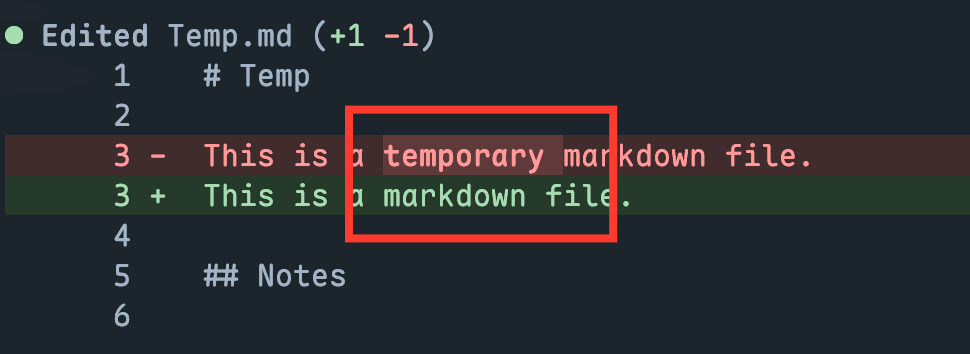
The temporary word is highlighted with the emphasis color.
A more readable side-by-side diff view may come later, beyond the current inline diff view!